How do I recover when Power*Tools crashes from a moved or deleted library?
When Power*Tools will not start up because the library file has been moved or deleted, you must clean the registry.
Error Messages:

Solution: Complete the following steps:
Step 1 - Click the Start Button, Navigate to Programs - Power Tools for Windows and select 'Delete PTW32 Registry Key'.

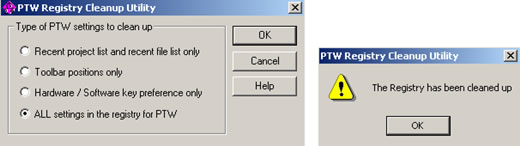
Step 2 - Select 'ALL settings in the registry for PTW' and click 'OK'. A new window will display that the registry has been cleaned up.
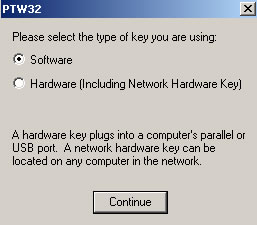
Step 3 - Launch Power*Tools for Windows. When prompted, select the appropriate key that you are using.
After successful completion of the above steps, Power*Tools should now operate.
If you have additional questions, please feel free to contact tech support.